Playback & Assertions
Replaying recorded user flows accurately is crucial for catching regressions. Test Garden supports highly customizable playback settings, assertions, wait conditions, and storage management parameters.
Playback Speed Configuration
In the steps sidebar header, you can click the settings gear to toggle between playback speeds:
- Normal Speed: Matches the recorded millisecond offset offsets to simulate actual user pacing.
- Fast Speed: Bypasses delays, executing subsequent actions as quickly as the page DOM is ready.
Visual Assertions
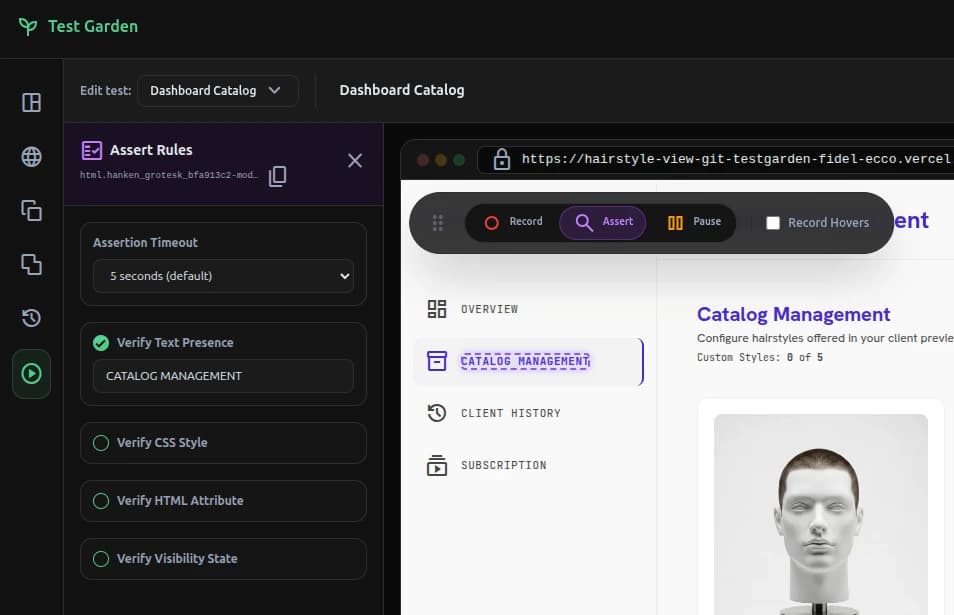
Assertions are checkpoints that must pass for the test run to be marked as successful. You can record assertions using Inspect Mode in the workspace:
- Text Content Verification: Confirms that a targeted node contains specific string values.
- Computed Styles Check: Queries the browser's
window.getComputedStyle()to validate colors, margins, fonts, or display states. - Attribute Verification: Asserts that custom HTML attributes (e.g.
disabled,readonly,href) match expectations.
Smart Wait Loops & Delays
To prevent tests from failing on slow API networks or slow transitions, Test Garden employs a Smart Wait Loop:
- Presence & Visibility Waits: Before executing an action or assertion, the replay engine polls the DOM periodically (up to a configurable timeout limit, e.g. 5 seconds) checking if the element is present, visible, or has been successfully hidden.
- Sleep Delay: You can manually inject a static delay (in milliseconds) using the Insert Step dropdown to pause playback for animations or external webhooks.
Manual OTP & Captcha Pauses
Certain steps cannot be easily automated, such as entering an SMS OTP, resolving a 2FA prompt, or solving a Captcha:
- You can insert a Wait for Captcha / OTP step (
wait_magic_link). - During playback, the replay engine will pause execution and display a prompt.
- The user can interact with the target iframe to manually solve the Captcha or type the code.
- Once solved, the user clicks Resume to continue.
Storage & Lifecycle Presets
From the Insert Step dropdown at the bottom of the sidebar, you can configure browser environments:
- Clear Storage: Wipes out cookies, local storage, and session storage. Note that the script automatically preserves the dashboard authentication tokens and the
tg_tokenhandshake key to prevent you from being logged out during tests. - Set Storage Values: Inject specific key-value pairs (like feature flags or auth tokens) into
localStorageorsessionStoragebefore the page loads. - Force Page Reload: Forces a complete browser refresh to test GDPR cookie consent banner behaviors.
Dynamic Runtime Variables
To test sign-up forms and prevent unique constraint conflicts, you can replace text values in inputs or assertions with dynamic placeholders:
{{random_email}}: Generates a randomized email (e.g.,user_4f982@testgarden.dev).{{random_name}}: Generates a random realistic first and last name.{{timestamp}}: Inserts the current UNIX timestamp in milliseconds.